

Best Platform to Host Your Highlight Reel for College Coaches
Upload your reel to YouTube as an unlisted video: it's free, it plays on any phone, and a coach doesn't need an account to watch it. If your team already films on Hudl, your Hudl reel link is the other strong free choice. YouTube won't tell you which coach watched, and we found nothing saying Hudl does. If you want to know which coach opened your reel, send each coach their own link to a recruiting page with the reel on it — that's what VarsityBio Pro does, for $9 a month.
This page covers where the finished video lives and how it reaches a coach. Still making the reel? Start with free sports video editing software, and see highlight video best practices for what to put in it.
Where Should You Host Your Highlight Reel?
| Option | Cost | Coach needs an account? | Do you learn whether it was watched? |
|---|---|---|---|
| YouTube (unlisted) | Free | No | Total views only, not who |
| Hudl | Free profile for athletes on a Hudl team | Not stated in Hudl's help pages | No per-coach view info in Hudl's docs |
| Google Drive | Free | Can be asked to sign in | A rough open count, visible to anyone who can watch it |
| Dropbox | Free | No | Only that a "Guest" viewed — not who |
| Vimeo | Free; unlisted links need a paid plan | No | Totals, through viewer analytics |
| Recruiting services (NCSA, SportsRecruits, FieldLevel) | Free tiers (NCSA, SportsRecruits); paid tiers vary | Coaches use the service | Usually a paid feature |
| VarsityBio | Video is Pro, $9/month | No | Pro: per link — when, where from, and how long it was viewed |
YouTube (unlisted or public)
Does well: It's free, and it plays everywhere. An unlisted video can be watched by anyone with the link, and the people you share it with don't need a Google account. It stays off your channel page, out of recommendations and subscribers' feeds, and out of YouTube search unless someone adds it to a public playlist. A public video does all the same and can also be found in search, which is fine if you want it found.
Falls short: You see view totals in YouTube Studio, but never who watched. YouTube may show ads on your video even if you never turned on monetization. And a YouTube link is just the video: your stats, grades and contact details have to travel separately, in the email.
Hudl
Does well: If your team uses Hudl, every athlete on a Hudl team gets a free recruiting profile, built from game film your coaches already upload. You can copy a reel's URL to email a recruiter, and Hudl's college contact tool sends a coach your message with a link to your profile at no extra cost. Opt in to recruiting and recruiters can also see your contact details, academics and full game film.
Falls short: It depends on your team. Coaches and administrators upload the film; whether you can upload your own depends on your team's settings. If your team isn't on Hudl, this option mostly isn't yours. We found nothing in Hudl's documentation saying it tells you when a coach watches.
Google Drive
Does well: You probably already have it, so there's nothing new to set up.
Falls short: Drive is built for files, and it shows. Google's own help page lists what a coach can run into: "Video is still processing" on a large file, a limit for viewers who aren't signed in that asks them to sign in, and playback that needs third-party cookies turned on. The open count is rough ("<5" below five) and anyone who can watch the video can see it. For a first email to a coach who has never heard of you, each of those is one more way the video might not play.
Dropbox
Does well: A shared link opens without a Dropbox account, and video previews work for files up to 100 GB — far more than a reel needs.
Falls short: Someone who opens your link without being invited shows up in viewer info only as "Guest" — you can't see their name or email — and "last viewed" information isn't on the free Basic plan. It also looks like what it is: a file share.
Vimeo
Does well: The free plan puts no ads on your video and includes viewer analytics. Viewers don't need a Vimeo account to watch an unlisted video.
Falls short: Unlisted, password and embed-only are paid-plan settings, so on the free plan a reel you can send by link is a public one. If a paid plan lapses, Vimeo switches unlisted videos to private — which breaks every link you've already sent (Vimeo's lapse FAQ).
Recruiting services
Does well: Services like NCSA, SportsRecruits and FieldLevel host or embed your video inside a profile on a service built for recruiting. SportsRecruits lets free accounts upload and embed unlimited video, including YouTube, Vimeo and Hudl links.
Falls short: Knowing who watched is usually a paid feature — at SportsRecruits, seeing which colleges viewed your profile and video is part of Pro. FieldLevel puts contacting colleges with a video on its $49 and $79 monthly tiers; its College Activity feed, which shows which colleges viewed your profile and watched your video, starts with the $29 Silver tier. NCSA doesn't publish prices.
A recruiting page you send yourself (VarsityBio)
Does well: Your reel sits on one page next to your stats, academics and schedule, so the coach gets the whole picture from one link instead of a bare video and a long email. And you send each coach a different tracked link, so a view is tied to the coach you sent it to. On Pro, each link shows when it was opened, where from, and how long the coach stayed.
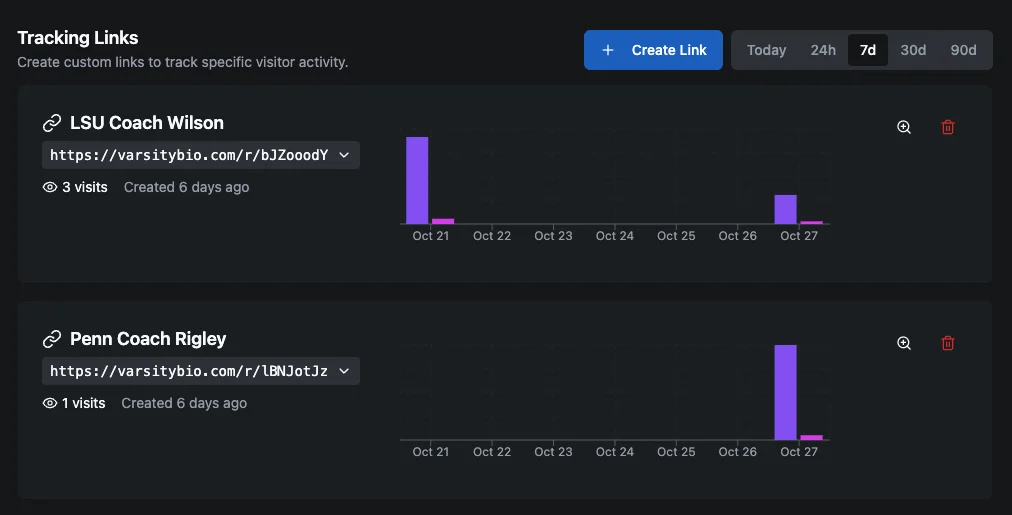
Falls short: Video on your page is a Pro feature ($9/month) — a free VarsityBio page can't show your reel. The free plan includes one tracked link that tells you whether it was viewed and how many times, but not when or for how long. And VarsityBio doesn't email coaches for you: you paste the link into your own email.
What's the Cheapest Way to Host a Highlight Reel?
Free. An unlisted YouTube video costs nothing, and so does a Hudl reel if your team is on Hudl. You don't need to pay anyone to host a highlight reel.
What money buys is information and reach: knowing which coach looked (VarsityBio Pro at $9/month, SportsRecruits Pro, FieldLevel from $29/month, Dropbox in a much weaker form), or a place in a recruiting service's database (FieldLevel's tiers run $29–$79/month; NCSA quotes on a call). Decide whether you need either before you pay for hosting you can get free.
What About Youth Sports Highlight Services?
Some services film your games and cut the clips for you. They solve a different problem — getting footage — and you still need somewhere for the finished reel to live and a link to send.
- GameChanger clips plays from baseball, softball and basketball games that are streamed and scored in the app. Shared player profiles can be viewed online without a subscription; building one takes a GameChanger Premium subscription.
- Veo makes cameras that record matches automatically. A Veo player profile collects your highlights behind one link that viewers open without logging in.
- Trace is a tripod AI camera that builds per-player highlights for soccer, basketball and football. Sharing works on its plans; downloading the clips is Pro only.
- Hudl Focus is a camera system your school or club buys; games land in the team's Hudl library, where you build a reel as above.
- Balltime, Hudl's volleyball product, makes highlight reels automatically on paid individual plans.
If a service gives you a shareable profile link, that can be your host. If it gives you clips or a file, put the finished reel on YouTube, Hudl or your recruiting page.
How Should You Send Your Highlight Reel to a Coach?
Send a link, not an attachment. It's what college programs ask for when they say anything at all: Middlebury women's soccer, for example, asks prospects to email the coach their player profile and "links to a highlight video." Put the link in the body of the email, near the top. How to Email College Coaches shows where it fits.
Test it like a coach would. Open the link on your phone while signed out of everything. If it asks for a login, says it's still processing, or starts a download, fix that before anyone else sees it.
Give each coach their own link if you want to know who opened it. Then read what a view does and doesn't mean in What Does It Mean When a Coach Views Your Profile? — a view is the start of an evaluation, not a verdict.
Know Which Coach Opened Your Reel
Put your reel, stats and story on one VarsityBio page and send each coach their own tracked link. Video and full view details are part of Pro ($9/month).
Get Started →